How Asset Managers Securely Connect Internal Data to AI Research Platforms
Most AI integration methods won't survive compliance review at an asset manager. Integration with Snowflake and Terminal X could be your firms answer.
Every institutional AI conversation eventually arrives at the same question. It’s usually not as simple as "does it work," or "how do we know this is accurate," but the one the CTO asks in the second meeting: how does our data get in, and where does it sit once it's there?
Internal research, investment memos, proprietary models, deal notes, and meeting transcripts are the most valuable parts of a firm's information stack. They are also, typically, the most sensitive. Any AI platform that wants to be useful to a buy-side research team has to be able to ingest this data. Any AI platform that wants to be deployable at a regulated institution has to do it without creating a compliance problem.
This is the part of institutional AI adoption that gets the least coverage. Vendor pitch decks focus on data accuracy and workflow demos, while analyst articles focus on use cases. Meanwhile, the aspect that determines whether a platform can actually be adopted by a firm after a security review is the data architecture.
Here’s how serious asset managers are handling it.
The Two Paths to Get Internal Data Into an AI Research Platform
There are two viable patterns for connecting a firm's private data to an institutional AI platform. Which one a firm chooses depends primarily on where their data already lives and how much infrastructure they want to build to support it.
1. Direct Upload
The first path is the simplest. A firm uploads folders or documents directly into the AI platform, either through drag-and-drop or a folder sync. Files are stored in a private workspace that only authenticated users from that firm can access, governed by permission rules the firm controls.
It is the fastest path to production, requiring minimal set up. Many of our institutional clients use this as their primary integration method and never move beyond it, because the workflow fits the way their analysts already operate.
2. Cloud Integration (Snowflake, Databricks, AWS S3, Google Drive, OneDrive, SharePoint)
The second path is for firms that already have a data layer and want the AI platform to operate on top of it rather than import from it. This covers integrations with AWS S3, Google Drive, OneDrive, SharePoint, Databricks, and Snowflake. Snowflake and Databricks deployment are the most sophisticated of these, and the integrations we see most frequently at large asset managers with mature data infrastructure.
Here is how it works in practice.
The firm's documents already land in Snowflake or Databricks, typically piped in from AWS S3 or similar storage through Snowpipe. Nothing about that pipeline changes. For Snowflake specifically, the AI platform deploys as a Snowflake Native App inside the firm's own Snowflake environment, meaning the agent systems run next to the firm's data rather than pulling the data out of it.
When an analyst runs a query in Terminal X, the agents read documents on demand from the firm's Snowflake database, do the retrieval and synthesis work within the Snowflake environment, and write the output to a designated output table within the firm's environment. The firm's sensitive content never leaves the firm's Snowflake account.
What does move back to the AI vendor is narrow and explicit: operational metadata of what was processed, and logs required for monitoring and service operations. No document content, no extracted text, no embeddings of client data. The data stays in the customer's boundary. In this architecture, Terminal X gets what it needs to operate the service and nothing else.
For compliance teams at regulated firms, this is typically the architecture that clears security reviews. It preserves the existing data governance model the firm has already built around Snowflake, applies the firm's existing access controls, and leaves the audit trail in a system the firm already owns.
Why This Architecture Matters for Buy-Side Firms
The value of running inside the client's environment is not theoretical. It addresses four specific concerns that come up in every institutional procurement process.
- Data residency and sovereignty. For firms with Korean, Japanese, European, or other regional data requirements, being able to say "the data never left our Snowflake account in our region" can be the difference between a deal closing and it dying in security review. The native app model inherits whatever residency controls the firm has already configured.
- Existing access controls. A firm that has spent years building role-based access to its data does not want to recreate that governance model in a new vendor's system. Running the AI agents inside the firm's Snowflake or Databricks environment means the firm's existing permissions still apply. An analyst who cannot see certain deal data in their environment cannot see it through the AI either.
- Audit defensibility. When a regulator or internal audit asks how sensitive data is handled, having that data housed and processed inside their own environment is much stronger than "we upload it to a third party and trust their security controls." The native app pattern puts the audit trail in the firm's hands.
- Vendor risk reduction. The less customer data that sits with the vendor, the less exposure the firm carries if the vendor is ever breached. For large institutional clients with formal vendor risk programs, this is an important factor in how a vendor is scored.
What the Snowflake Native App and Databricks Pattern Actually Looks Like
The architecture is straightforward once you map it out.
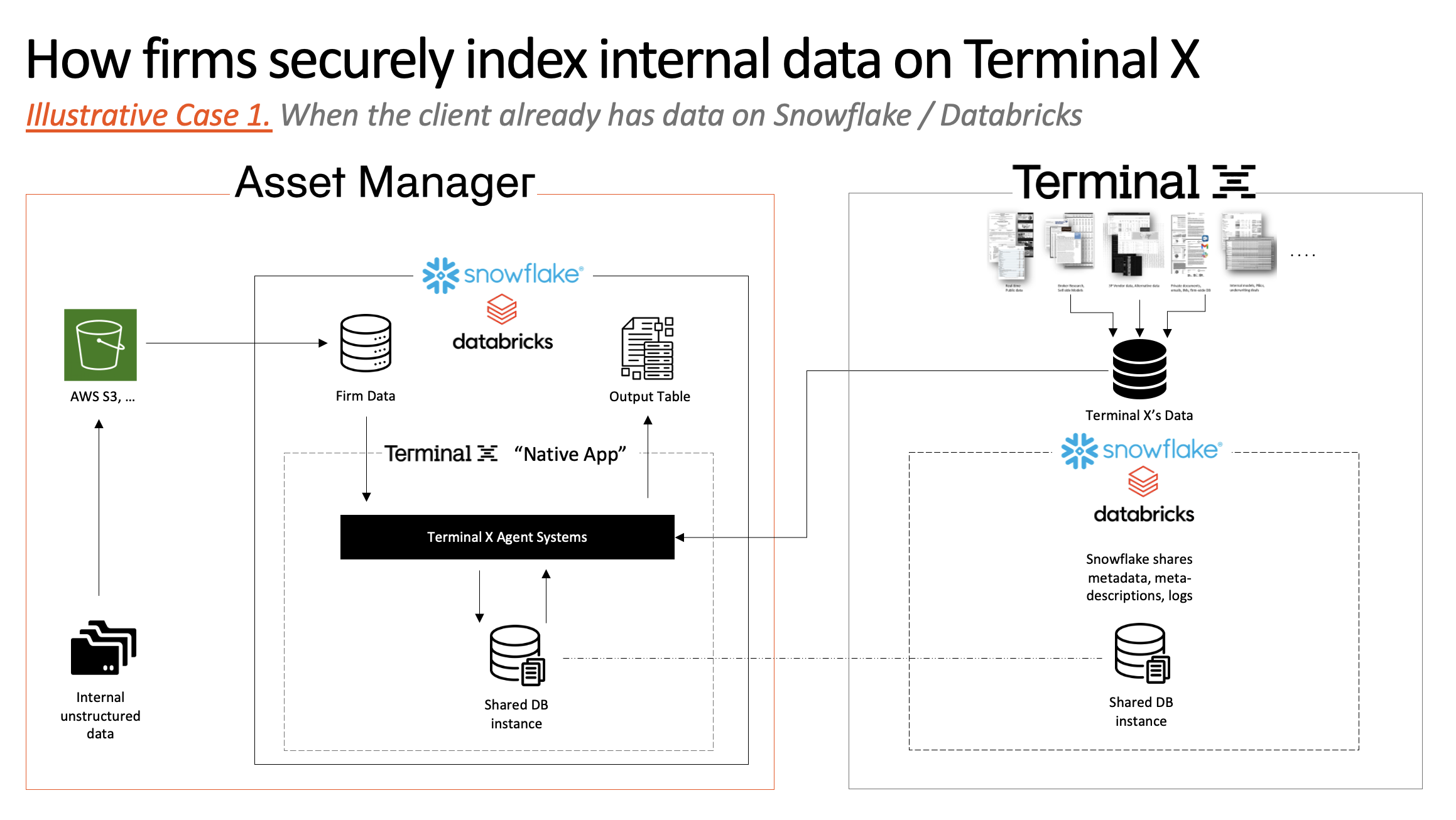
Terminal X’s own data (external sources like SEC filings, earnings transcripts, Bloomberg, FactSet, CapIQ, Broker Research, other real-time market data) sits in a separate Snowflake or Databricks account on the vendor side. The two sides exchange what is strictly necessary through a Snowflake or Databricks share: metadata, logs, and the operational signals the vendor needs to run the service. The client's document content stays on the client's side.
Three Questions to Ask a Vendor Before Signing
Not every vendor that claims to support "enterprise data integration" actually does this. A few questions surface whether a platform can genuinely meet institutional requirements or whether the claim is marketing.
Does the platform support deployment inside our cloud environment, or does it require us to move data to yours? The answer should be specific. Snowflake Native App, AWS PrivateLink, Azure Marketplace, or similar. If the answer is along the lines of "we have strong encryption," this is a red flag.
What data leaves our environment during normal operation? A credible vendor can name exactly what flows back to them. Metadata, logs, and service telemetry are acceptable. Document content, extracted text, or embeddings of client data should raise concerns.
Is client data used to train the vendor's models? The answer for most vendors should be no. This should be well documented in the data processing agreement, and confirmed with the SOC 2 report.
What This Means for Asset Managers Evaluating AI Right Now
The firms pushing hardest on AI research are also the ones with the most mature data infrastructure. An asset manager with data already centralized in Snowflake or Databricks has a much faster path to production AI than one that is still running research off shared drives and email attachments.
For firms in the first category, the conversation with an AI vendor should start with the deployment architecture. A vendor that can connect directly to your existing cloud infrastructure, whether that is Snowflake, Databricks, AWS S3, Google Drive, OneDrive, or SharePoint, lets you bring AI to your data rather than the other way around. For firms with data centralized in Snowflake, the Native App pattern is the strongest version of this: it is the shortest path through security review, and the one that is defensible when a regulator asks how sensitive information is handled.
For firms without an existing data layer to integrate against, direct upload remains a legitimate starting point. Many of the largest users of institutional AI platforms began with direct upload and migrated to native app deployments later as their data infrastructure matured. We see this pattern play out at Terminal X once clients recognize the efficiency gains from having their documents surfaceable with a simple query, as opposed to wrangling and uploading every document themselves.
The worst option is the one some firms still end up with: an AI tool that requires data to be duplicated into a third-party environment, with unclear controls, an audit trail the firm cannot see, and a data processing agreement that glosses over how training data is handled. That architecture does not survive a serious compliance review.
Bringing AI to the Data
While the deployment architecture is the part of institutional AI that rarely makes it into the product demo, it’s the part that determines whether the product ever gets used. For asset managers operating under SEC, FINRA, FSA, or FSC oversight, the standard should be straightforward. Your data stays in your environment, your access controls still apply, your audit trail stays yours, and the vendor gets only what it needs to run the service.
Terminal X supports both direct upload for firms that want the simplest path to production, and native app deployment inside the firm's Snowflake or Databricks environment for firms with mature data infrastructure and strict governance requirements. In either case, client data is never used to train models, access is governed by the firm's existing permissions, and every output is traceable to the source document it was drawn from.
If your firm is evaluating AI research platforms for finance and your security team is asking the architecture question, that is the right question. For more information on how to combine your entire firm's data with millions of public and private financial data sources, get a demo here.
More insights

Nvidia's $250 Billion OpenAI Backstop and the Semiconductor Slump
What the Reported Guarantee Does (and Doesn't) Buy

From AI Agents to Institutional Memory: What's Next for Real Estate
Terminal X London with DWS | How AI is transforming Real Estate Investment: from underwriting and asset management

Private Credit Crisis: Bubble or Business as Usual?
Looking for stability in an opaque industry